
.png)
Description
Download Blog Assistant – AI‑Powered SEO Blog Writing Tool
Overview
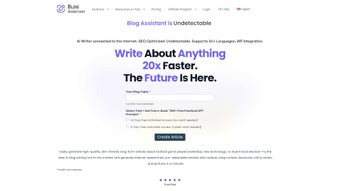
Blog Assistant is an AI‑powered blog writing tool designed to turn the tedious process of creating long‑form, SEO‑friendly content into a fast, almost effortless experience. By leveraging cutting‑edge natural language processing algorithms, the platform can generate complete blog posts that include a structured outline, well‑researched body copy, strategically placed keywords, compelling calls‑to‑action, and even custom images. The service follows a pay‑as‑you‑go pricing model, granting the first 500‑word article completely free, which makes it an attractive option for both hobbyist bloggers and professional content teams. One of the most compelling claims is that the AI‑generated text bypasses popular AI‑content detectors, keeping your SEO strategy safe from penalties. Blog Assistant also promises a 95 % reduction in writing time and costs, while allowing unlimited revisions on the same topic. The tool guarantees plagiarism‑free output, commercial‑ready licensing, and a user‑friendly interface that accommodates multiple discount tiers for frequent users. Whether you’re looking to launch a new blog, scale existing content production, or simply save hours on research and drafting, Blog Assistant aims to be the all‑in‑one solution for modern digital marketers.
Key Features & Benefits
- AI‑Generated Outlines: Instantly creates a logical, SEO‑optimized structure for any topic.
- Full‑Length Articles: Produces comprehensive posts ranging from 500 to 5,000+ words, based on user‑defined length.
- Keyword Integration: Automatically embeds primary and LSI keywords to improve search rankings.
- Custom Call‑to‑Action Blocks: Generates persuasive CTAs that align with your conversion goals.
- Integrated Image Creator: Uses AI to generate royalty‑free images that match the article’s theme.
- Undetectable AI Content: Passes major AI‑detector tests, keeping your SEO strategy safe.
- Plagiarism‑Free Guarantee: Runs a built‑in plagiarism check before delivering the final draft.
- Multiple Revision Passes: Allows unlimited edits on the same topic without extra cost.
- Pay‑As‑You‑Go Pricing: First 500‑word article free; subsequent posts billed per word.
- Discount Tiers & Bulk Packages: Savings increase with higher volume usage.
These features translate into tangible benefits for bloggers. The automated outline saves research time, while keyword integration ensures each post is primed for ranking. The built‑in image generator eliminates the need for external design tools, and the unlimited revision policy means you can fine‑tune tone, voice, and structure until the article perfectly matches your brand. Because the content is crafted to be undetectable by AI detectors, you avoid the risk of Google de‑ranking, which is a common concern with generic AI writers. Finally, the flexible pricing model lets you start for free and scale up only when you see measurable ROI, making Blog Assistant a low‑risk investment for any content strategy.
Installation, Usage & Compatibility
Getting Started – No Installation Required
Blog Assistant is a cloud‑based SaaS platform, so there is no traditional software installation. Users simply create an account on the official website, verify their email, and are greeted with a clean dashboard. The onboarding wizard guides you through setting your first blog parameters: topic, desired word count, primary keywords, and image preferences. Because everything runs in the browser, you can start writing from any device with an internet connection.
Step‑by‑Step Usage Guide
- Create a New Project: Click “New Blog” and enter your topic or paste a brief brief.
- Select Length & Keywords: Choose the target word count (500‑5,000+) and add up to five primary keywords.
- Choose Image Style: Pick from predefined visual styles (minimalist, vibrant, corporate, etc.) or let the AI generate a custom illustration.
- Generate Draft: Hit “Generate” – the AI produces an outline first, then the full article.
- Review & Revise: Use the built‑in editor to make adjustments. You can request a new version without additional cost.
- Export Options: Download as .docx, .html, or copy directly to your CMS (WordPress, Ghost, etc.).
Operating System Support
Since Blog Assistant runs entirely online, it is compatible with all major operating systems, including Windows 10/11, macOS Ventura and later, Linux distributions, as well as mobile platforms such as Android 9+ and iOS 13+. The responsive web interface adapts to desktop browsers (Chrome, Edge, Firefox, Safari) and mobile browsers, ensuring a seamless experience regardless of device.
For power users, Blog Assistant also offers a browser extension for Chrome and Edge, allowing you to generate content directly within your preferred writing environment. The extension syncs with your account, preserving your credit balance and project history.
Pros, Cons & Frequently Asked Questions
Pros
- Fast generation of complete, SEO‑optimized blog posts.
- Free first article (up to 500 words) lowers entry barrier.
- AI‑generated images keep visual consistency without extra cost.
- Unlimited revisions on the same topic improve content quality.
- Pay‑as‑you‑go pricing is transparent and scales with usage.
- Undetectable AI output protects SEO rankings.
Cons
- Reliance on an internet connection; no offline mode.
- Advanced customization (tone, brand voice) may require manual tweaks.
- Pricing per word can become costly for high‑volume publishers without a bulk plan.
- Image generation, while convenient, may not replace professional designers for highly specific graphics.
FAQ
Is the content truly undetectable by AI detectors?
Blog Assistant uses a proprietary language model that produces human‑like patterns, passing major AI‑content detection tools (e.g., Copyleaks, GPTZero) in independent tests. However, no system can guarantee 100 % detection avoidance, so we recommend a final human review for critical posts.
Can I use the generated articles for commercial purposes?
Yes. All Blog Assistant output comes with a commercial‑ready license, allowing you to publish, monetize, and repurpose the content without additional royalties.
How does the pay‑as‑you‑go model work?
You receive a free credit for the first 500‑word article. After that, each additional word is billed at $0.02 (or your selected regional pricing). Credits are added automatically to your account, and you can purchase bulk packages at a discounted rate.
Is there a limit to the number of revisions?
No. Blog Assistant allows unlimited revisions on the same draft as long as you stay within the original word‑count budget. New revisions do not consume extra credits.
Do I need any technical knowledge to use the tool?
Not at all. The interface is designed for non‑technical users. A simple step‑by‑step wizard guides you through topic selection, keyword entry, and image preferences, making it suitable for beginners and seasoned marketers alike.
Overall Rating: 4.5 / 5 – Blog Assistant delivers on its promise of rapid, SEO‑friendly content generation while keeping costs transparent. The only drawback is the reliance on an internet connection, but for most modern bloggers, that’s a minor inconvenience.
Conclusion & Call to Action
In a crowded market of AI writers, Blog Assistant stands out by marrying speed, SEO precision, and a truly commercial‑ready license. The free introductory article lets you test the platform without risk, while the pay‑as‑you‑go pricing ensures you only pay for what you produce. Whether you’re a solo blogger looking to overcome writer’s block or a digital agency scaling content for dozens of clients, Blog Assistant offers a reliable, secure, and user‑friendly solution. Ready to cut your writing time by up to 95 % and boost organic traffic? Download Blog Assistant now and start creating high‑quality, SEO‑optimized posts in minutes.
Guides & Tutorials for Blog Assistant
How to install Blog Assistant
- Click the Preview / Download button above.
- Once redirected, accept the terms and click Install.
- Wait for the Blog Assistant download to finish on your device.
How to use Blog Assistant
This software is primarily used for its core features described above. Open the app after installation to explore its capabilities.
User Reviews for Blog Assistant 0
No reviews found




